> ## Documentation Index
> Fetch the complete documentation index at: https://docs.markapidown.net/llms.txt
> Use this file to discover all available pages before exploring further.
# Reqbook API Testing Quickstart
> Install Reqbook, create markdown API specs, open the browser UI, and run an agent-friendly API test in minutes.
# Quickstart
This path is for a developer who wants Reqbook working with a coding agent and a browser UI in a few minutes. The terminal is still there for automation, but it is not the only interface.
***
## 1. Install Reqbook
```bash theme={null}
curl -fsSL https://markapidown.net/install.sh | sh
```
```bash theme={null}
cargo install reqbook
```
```bash theme={null}
npm install -g reqbook
```
Verify the install:
```bash theme={null}
rqb version
```
***
## 2. Create a project
```bash theme={null}
mkdir my-api && cd my-api
rqb init --name=my-api --dev-url=https://jsonplaceholder.typicode.com --yes
```
Reqbook creates:
```text theme={null}
api-docs/
├── README.md
├── reqbook.md
├── _shared/
│ ├── env.template.md
│ └── env.md
├── apis/
│ └── posts/
│ └── get-posts.md
└── flows/
.gitignore
```
The generated endpoint uses JSONPlaceholder, so it can run immediately.
The generated `.gitignore` includes `.env.local` and `api-docs/_shared/env.md`, while `api-docs/_shared/env.template.md` stays commit-ready for new contributors.
***
## 3. Open the web UI
```bash theme={null}
rqb serve
```
Open `http://127.0.0.1:8080`.
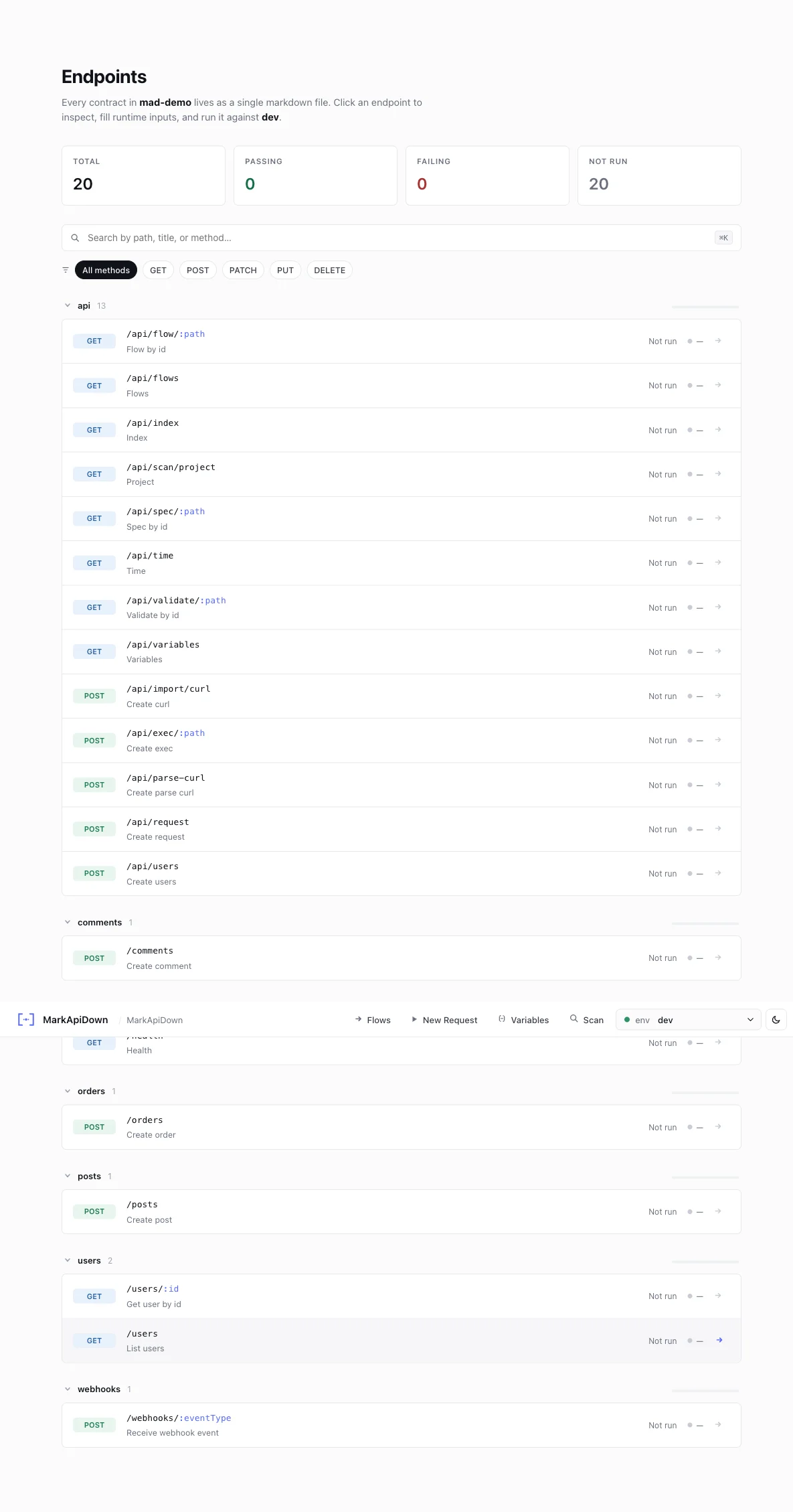 Use the browser UI to:
* browse endpoint files,
* switch environments,
* fill path params such as `postId`,
* add runtime-only headers or body overrides,
* run requests and inspect formatted responses,
* import an endpoint from cURL,
* open the flow canvas.
Runtime fields in the request builder are temporary. They do not change markdown files unless you switch to edit mode and save.
***
## 4. Run the same spec from the terminal
```bash theme={null}
rqb exec api-docs/apis/posts/get-posts.md --env=dev
```
Expected output:
```text theme={null}
GET https://jsonplaceholder.typicode.com/posts/1
status: 200
duration: 180ms
```
Dry-run shows the resolved request without sending it:
```bash theme={null}
rqb exec api-docs/apis/posts/get-posts.md --env=dev --dry-run
```
```text theme={null}
GET https://jsonplaceholder.typicode.com/posts/1
status: DRY RUN
duration: 0ms
headers:
accept: application/json
```
***
## 5. Install agent skills and MCP
```bash theme={null}
rqb skills install
rqb install mcp
```
Or choose one agent:
```bash theme={null}
rqb skills install --agent=claude-code
rqb install mcp --agent=claude-code
rqb skills install --agent=cursor
rqb install mcp --agent=cursor
rqb skills install --agent=copilot
rqb install mcp --agent=copilot
```
Now you can ask your coding agent:
```text theme={null}
Use rqb_context with mode=surgical, brief=true, max_fields=6, then add a Reqbook spec for GET /users/:userId and validate it.
```
Or:
```text theme={null}
Create a flow that gets a post, captures userId, then gets that user.
```
***
## 6. Validate before commit
```bash theme={null}
rqb validate api-docs/
```
Commit the markdown files, not hidden app state.
***
## Next steps
Preview, validate, run, and inspect specs from your editor.
Install skills, slash commands, and MCP for supported coding agents.
Learn the browser UI: request tweaks, mock mode, cURL import, flow canvas.
Patterns for using Reqbook as the API layer in your agent loop.
Use the browser UI to:
* browse endpoint files,
* switch environments,
* fill path params such as `postId`,
* add runtime-only headers or body overrides,
* run requests and inspect formatted responses,
* import an endpoint from cURL,
* open the flow canvas.
Runtime fields in the request builder are temporary. They do not change markdown files unless you switch to edit mode and save.
***
## 4. Run the same spec from the terminal
```bash theme={null}
rqb exec api-docs/apis/posts/get-posts.md --env=dev
```
Expected output:
```text theme={null}
GET https://jsonplaceholder.typicode.com/posts/1
status: 200
duration: 180ms
```
Dry-run shows the resolved request without sending it:
```bash theme={null}
rqb exec api-docs/apis/posts/get-posts.md --env=dev --dry-run
```
```text theme={null}
GET https://jsonplaceholder.typicode.com/posts/1
status: DRY RUN
duration: 0ms
headers:
accept: application/json
```
***
## 5. Install agent skills and MCP
```bash theme={null}
rqb skills install
rqb install mcp
```
Or choose one agent:
```bash theme={null}
rqb skills install --agent=claude-code
rqb install mcp --agent=claude-code
rqb skills install --agent=cursor
rqb install mcp --agent=cursor
rqb skills install --agent=copilot
rqb install mcp --agent=copilot
```
Now you can ask your coding agent:
```text theme={null}
Use rqb_context with mode=surgical, brief=true, max_fields=6, then add a Reqbook spec for GET /users/:userId and validate it.
```
Or:
```text theme={null}
Create a flow that gets a post, captures userId, then gets that user.
```
***
## 6. Validate before commit
```bash theme={null}
rqb validate api-docs/
```
Commit the markdown files, not hidden app state.
***
## Next steps
Preview, validate, run, and inspect specs from your editor.
Install skills, slash commands, and MCP for supported coding agents.
Learn the browser UI: request tweaks, mock mode, cURL import, flow canvas.
Patterns for using Reqbook as the API layer in your agent loop.